What is Maken: from an idea to an electronic prototype you can manufacture
Maken turns a need described in your own words into a real electronic prototype: requirements, parts, schematic, firmware, PCB, enclosure and verification, in a single flow you can review step by step.
Almost everyone has, at some point, an idea that needs a bit of electronics. Knowing whether it will freeze tonight in the vegetable patch. Watering that switches itself on, zone by zone. A notification on your phone when someone opens a door. A panel to teach logic gates in class.
The idea fits in a sentence. The road to holding it in your hand does not: you have to decide what to measure and how precisely, choose parts that exist and can be bought, draw a schematic without mistakes, write the firmware, design a board a manufacturer will accept, think about the enclosure and, finally, order it all without surprises in the quote. That is half a dozen disciplines and as many tools.
Maken exists to walk that road with you.
What Maken does
You tell Maken what you need, in your own words, with no electronics background. From there:
- It understands the problem. It asks what it needs to know, one thing at a time: where the device will live, how it is powered, what it has to report and to whom. Everything becomes requirements you can see and correct.
- It tells you whether it is worth building. If what you need is already sold, and sold well, it says so. There is no point designing a board for something you can buy for twenty euros.
- It designs the architecture. First what the system must do (measure, decide, notify, act); then with which technologies.
- It picks real parts. From JLCPCB's catalogue, with stock and price, preferring basic parts, which carry no assembly loading fee. If a part cannot be manufactured or drawn, it says so and looks for another.
- It draws the schematic and checks it with an ERC (the electrical review an engineer would do): unconnected pins, power rails, missing pull-up resistors…
- It writes and compiles the firmware for the chosen microcontroller.
- It designs the PCB in KiCad, routes it and runs DRC. You can see it in 2D and 3D, with every part explained: what it is, what it is for and why it is there.
- It simulates it. Move the temperature, press a button, and see in the 3D model which LED or relay turns on. If the firmware depends on schedules or Wi-Fi, Maken generates a hardware test program that you can also flash onto the real board.
- It designs an enclosure you can 3D print, made to fit the board: standoffs, room for tall parts, cable glands and a lid.
- It verifies and quotes it. Before manufacturing, Maken checks the board against the manufacturer's rules and works out the cost, line by line.
The result is not a pretty picture: it is the files a manufacturer asks for (Gerbers, bill of materials, part placement), the KiCad project, the firmware and a report of what was decided and why.
What makes Maken different
Everything is traceable. Every decision is recorded with its reason: why this sensor and not another, why this regulator, which requirement asks for it. And every change to the project is kept in a history, like a program's source code, so you can see how it came to be.
It says what it does not know. If part of the design cannot be built with what is available, Maken does not hide it: it explains what is missing and what could change. A half-finished design presented as done is worse than no design at all.
It is made to be manufactured. The parts exist, are in stock and have a footprint; the board meets a real manufacturer's rules. The goal is not a drawing, it is a prototype that works on your desk.
An engineer can review all of it. The files are the standard ones (KiCad, PlatformIO) and the reasoning is in plain sight. Maken does not replace a professional's judgement: it takes away the repetitive work and leaves the decisions that matter.
Maken Hub: start from what already exists
A lot of hardware has already been invented and published under open licences. Maken Hub gathers open projects (board, schematic, bill of materials) and reads them file by file: which microcontroller they use, which sensors, how they are powered, which manufacturing checks they pass.
Always with the original author and the licence in plain view: Maken indexes and analyses, it does not take ownership. When the licence allows it, you can start from one of those projects and ask Maken to adapt it: "make it battery powered", "add LoRa", "make it cheaper to manufacture".
Designing as a team
A project can be shared with other people, who can edit it or just view it. Everyone inside sees, live, where each person is looking and which part they have selected, and every change is signed by whoever made it. When sharing, the owner also decides who pays for what each person does with Maken.
Who it is for
- Makers and hobbyists with a clear idea who do not want to spend months learning five tools.
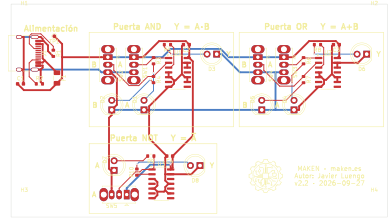
- Teachers who want their own classroom material: our demo is a logic-gates panel designed this way.
- Companies and founders who need to validate a prototype before investing in a full development.
- Engineers who want to reach the first version sooner and spend their time where their experience is really needed.
Where we are
Maken is in beta. The whole flow — from the conversation to a prototype with PCB, firmware and enclosure — works today, and every week the catalogue of parts it can draw, and the kinds of project it can handle, grow. Ordering manufacturing directly from Maken is coming soon; meanwhile it delivers everything a manufacturer needs to do the job.
There are two ways to use it. Maken Studio is free: it is for exploring many ideas and deciding which are worth building. Maken Build is for when you say "this one": it turns a validated concept into engineering ready to manufacture.
If you have an idea that needs electronics, tell us about it. Or start with the demo and look inside a project made with Maken.